

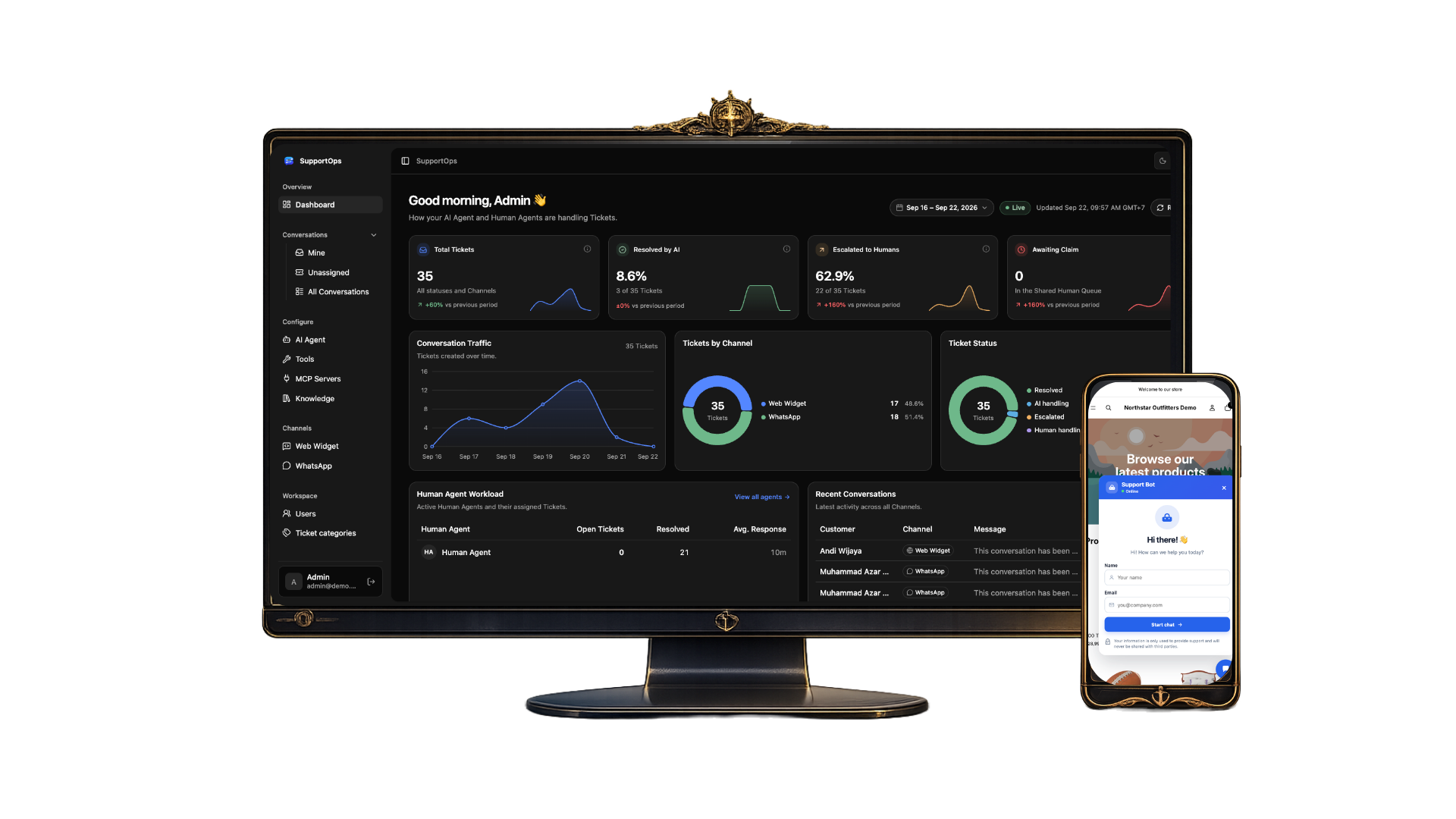

SupportOps: AI-First Omnichannel Support Platform
A multi-tenant customer support SaaS where an AI Agent answers every conversation first — grounded in company knowledge and live business data — and hands off to a Human Agent with full context the moment it cannot resolve a case safely.
An end-to-end production system: Web Widget and WhatsApp channels, RAG over pgvector, HTTP and MCP tools, a shared human queue with AI Copilot, background workers, OpenTelemetry tracing, a 78-case eval suite, and a measured model cost of roughly Rp113 per session.
SupportOps centralizes customer conversations from multiple channels into one support workspace. A customer writes through the embedded Web Widget or WhatsApp; the AI Agent retrieves answers from Customer-Safe Knowledge Sources, the customer's own ticket history, attachments (OCR and transcription), and assigned HTTP or MCP business tools. It then decides to REPLY, CLARIFY, RESOLVE, or ESCALATE. Escalated tickets land in a Shared Human Queue where Human Agents claim them, receive an auto-generated handoff summary, and can ask the AI Copilot for a suggested reply. Admins manage knowledge, tools, channels, the widget, and analytics — all scoped to their own Workspace.
Core Value
Small-to-medium SaaS support teams typically juggle live chat, a WhatsApp phone, and an email inbox with no shared queue, context, or knowledge base. That leads to slow responses, duplicated work, scattered policies, and painful handoffs. SupportOps solves this by separating AI reasoning from channel transport: one AI Agent serves every channel, answers only from grounded sources, and escalates with a clear reason instead of guessing — so customers get instant answers 24/7 and humans only handle what truly needs them.
What Makes It Stand Out
What makes SupportOps my flagship project is that it was engineered like a real product, not a demo. Every major decision is recorded in 20 Architecture Decision Records, the domain language is defined in a shared CONTEXT.md, multi-tenancy is enforced at the ORM layer rather than by convention, and the AI Agent's behavior is measured with a repeatable 78-case, 11-metric evaluation suite. Quality, latency, and cost were tuned iteratively (baselines B0 → B3), including a 76% reduction of the tool manifest, while the whole system ships through a CI/CD pipeline to Docker containers on a VPS.
AI Agent First, Humans When It Matters
The AI Agent handles every conversation first and chooses between REPLY, CLARIFY (max two clarifications), RESOLVE, or ESCALATE. Escalations carry a fixed reason — insufficient knowledge, customer asked for a human, internal action required, conflicting sources, tool failure, or AI timeout.
Omnichannel via Channel Adapters
A drop-in Web Widget (vanilla TypeScript inside a Shadow DOM, with Pre-Chat and secure Session Links) and WhatsApp through the Meta Cloud API. Channel Adapters normalize inbound and outbound messages so new channels never touch the support logic.
Grounded RAG Knowledge Base
Admins add PDFs (with OCR), crawled documentation, and plain text, which are chunked and embedded into pgvector. Each source is marked Customer-Safe or Internal-Only, and ingestion progress is visible as sources auto-publish.
HTTP & MCP Business Tools
Give the AI Agent access to live business data — orders, invoices, products, inventory — through HTTP Tools or tools discovered from MCP servers, each reviewed and explicitly assigned per Workspace.
Human Agent Inbox & Shared Queue
Mine / Unassigned / All views, claim-and-reply, Admin Takeover, ticket priority and category, attachments, and a full activity timeline. Once a human takes over, the AI stops replying to the customer.
Escalation Summary & AI Copilot
When a Human Agent claims a ticket, a fresh handoff summary is generated — customer need, escalation reason, and what was already tried — and the agent can request an on-demand AI Suggested Reply.
Follow-Up, Auto-Resolution & Idle Closure
Configurable, contextual follow-ups and auto-resolution for AI-handled tickets run as delayed jobs in the background worker, keeping the main request path fast.
Streaming Replies & Analytics Dashboard
Web replies stream token by token over Server-Sent Events, while the dashboard shows ticket volume, AI resolution vs. escalation, and support performance per Workspace.
Web Widget Conversation
Customers chat through an embeddable Shadow DOM widget with Pre-Chat, streamed AI replies, and attachments.
AI Agent Decision Flow
Each message is normalized, classified, and passed through the Ticket Eligibility Gate before the AI Agent grounds its answer and decides to reply, clarify, resolve, or escalate.
Human Agent Inbox
Mine, Unassigned, and All views with claim-and-reply, escalation summaries, AI Copilot suggestions, and a full activity timeline.
Knowledge Sources
PDFs, crawled docs, and text sources with visible ingestion progress and Customer-Safe or Internal-Only visibility.
Tools & MCP Servers
HTTP Tools and MCP-discovered tools reviewed and assigned per Workspace to give the AI Agent live business data.
Analytics Dashboard
Workspace-level analytics for ticket volume, AI resolution versus escalation, and support performance.
Channel-Agnostic AI Agent Boundary
Built on the Anvia agent SDK, the AI Agent receives normalized conversation input and returns schema-validated decisions without knowing how messages are delivered. Web replies stream directly over SSE, while WhatsApp flows through a webhook, a queue, and the worker before being sent back via Meta — both backed by the same reasoning runtime.
Multi-Tenancy Enforced by Construction
Every row belongs to exactly one Workspace, and isolation is enforced by a Prisma client extension instead of relying on developers to remember a filter — so retrieval, tools, and tickets can never leak across tenants.
Guardrailed Tool Runtime
Only tools assigned to the Workspace are visible to the AI. Read-only tools run when relevant, mutating tools (like updating a cart) run only on explicit customer request, irreversible actions require an AI proposal plus customer confirmation, tool output is treated as untrusted data, and the tool loop is bounded by a call budget and a 60-second timeout.
Measurable AI with a 78-Case Eval Suite
78 eval cases across 11 metrics — policy facts, edge cases, tool use, escalation, conflicting or stale sources, refusal-to-guess, visibility, guardrails, language, and attachments — including negative controls designed to fail. The production agent runs unmodified against real Knowledge Sources, scored by exact checks plus an LLM judge, reaching 100% on target metrics at baseline B3.
Measured, Predictable Cost
Session costs were profiled from real runs: a simple FAQ costs about $0.0014, an escalation about $0.0027, and a typical session around Rp113. With 77–96% of Main Model input served from cache, 10,000 sessions per month are projected under $100 including infrastructure.
Decision-Driven Architecture
20 Architecture Decision Records document the why behind the system — pgvector over Qdrant, SSE over WebSockets, Shadow DOM widget isolation, vanilla JS widget, VPS containers over Cloudflare, session-scoped Agent Memory, and model-directed tool selection.
Keeping the AI Honest
An AI that guesses is worse than no AI in customer support. Designing strict grounding rules, conflict detection, a clarification limit, and explicit escalation reasons — and proving them with evals — was the core challenge.
Separating Reasoning from Transport
Web chat is synchronous and streamed while WhatsApp is asynchronous and webhook-driven. Building one AI Agent runtime that serves both without channel-specific logic leaking in required a clean Channel Adapter boundary and moving WhatsApp reasoning into the worker.
Safe Tool Execution
Letting an AI read and change business data raised hard questions about trust. Tiering tools by risk, requiring customer confirmation for irreversible actions, and escalating on tool failure kept automation useful without being dangerous.
Optimizing Cost Without Losing Quality
Every cost optimization had to be validated against the full eval suite. Fixing prompts and retrieval rather than tests, one change at a time, made it possible to shrink the tool manifest by 76% while keeping quality at target.
Clean AI-to-Human Handoff
A handoff is only useful if the human doesn't have to reread the entire conversation. Generating the escalation summary at claim time — so it's always current — and stopping the AI after takeover made the transition seamless.
Production AI Agent Design
Learned how to build an AI Agent with bounded tool loops, grounded answers, typed decisions, and guardrails that make its behavior predictable enough to trust with real customers.
RAG & Retrieval Quality
Gained hands-on experience with ingestion, chunking, embeddings in pgvector, visibility-scoped retrieval, and measuring recall against gold chunks.
Evaluation-Driven AI Development
Learned to treat AI behavior like code under test — building eval cases, negative controls, and LLM judges, then iterating on baselines instead of tuning by feel.
Multi-Tenant SaaS Architecture
Practiced designing tenant isolation, role-based access, and per-Workspace configuration of channels, knowledge, and tools from the data layer up.
Distributed Systems & Background Jobs
Worked with queues, delayed jobs, webhooks, SSE streaming, and idempotent processing across an API, a worker, and multiple channels.
Observability, Cost & DevOps
Instrumented the system with OpenTelemetry, profiled per-session LLM cost, and shipped it through a CI/CD pipeline with Docker, GHCR, and a VPS deployment with rollback.
Project Info
Highlights
- AI-First Support with Human Escalation
- Web Widget + WhatsApp via Channel Adapters
- RAG over pgvector with Customer-Safe Visibility
- HTTP & MCP Business Tools with Risk Guardrails
- Multi-Tenant Isolation via Prisma Extension
- 78-Case, 11-Metric AI Evaluation Suite
- AI Agent Runtime Built on Anvia
- ~Rp113 Model Cost per Session
- 20 Architecture Decision Records
- CI/CD to Docker Containers on a VPS